
Ranked #7
Promptchan
An unfiltered image and video studio, with the chat in a supporting role.
What we liked
- +The most configurable generator in the ranking: styles, poses, emotions, negative prompt, visible seed
- +The community feed shows the prompt and settings behind every image, and clones in one click
- +Irish operator (VisionAI Labs Limited, Dublin): a public address, and someone identifiable behind it
- +A genuinely usable free tier: a daily Gem allowance, no card required
What we did not
- −Everything costs Gems: budget roughly 2 for an image, 18 for a video
- −Full video, custom characters and voice calls are locked to the $33.99 Pro plan
- −The chat stays an accessory to the generator, and switching modes wipes the history
- −In public mode you grant a very broad licence over what you generate
Free tier, no card required.
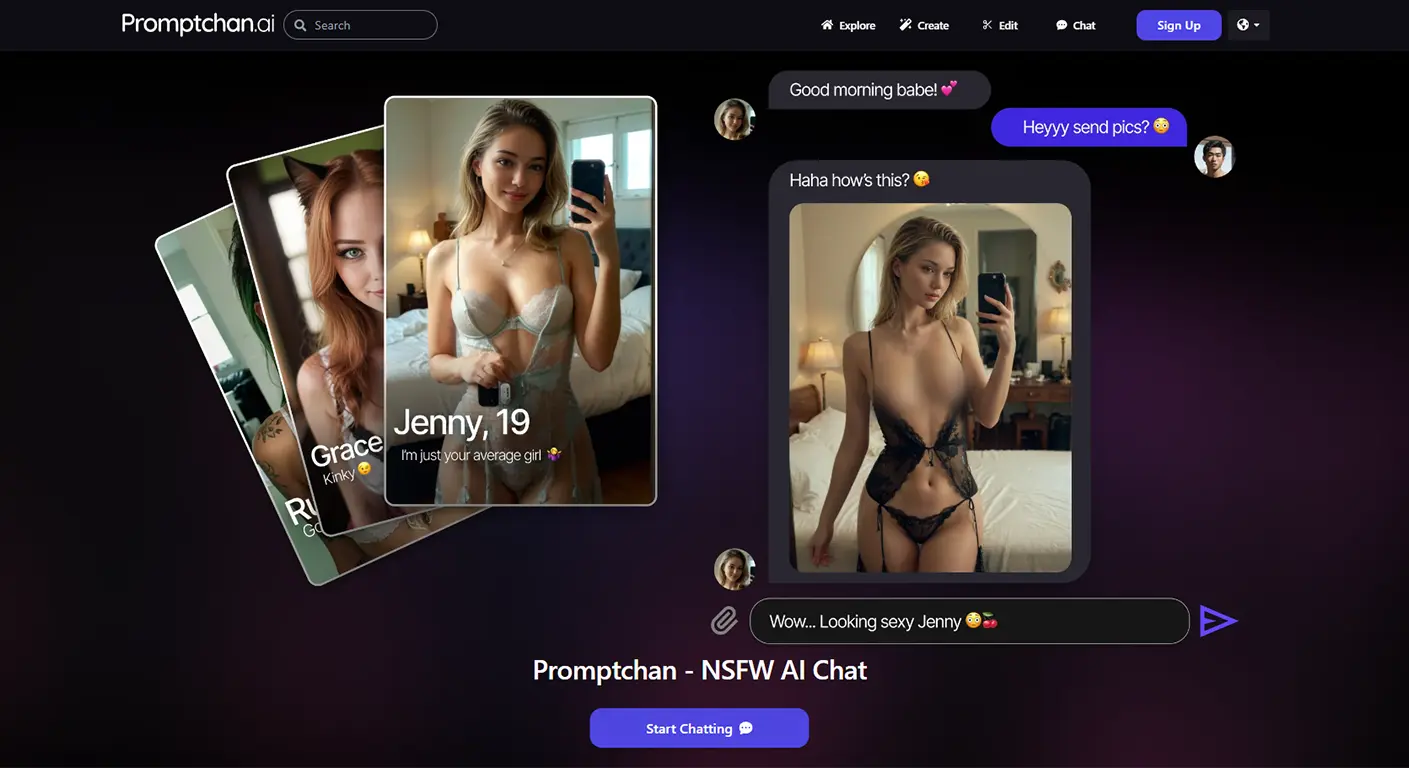
What you’re buying
Promptchan doesn’t open on a girlfriend. It opens on twenty million of them.
That’s the tell. Scroll first, characters second: the landing screen is a feed of community images and videos, not a roster of companions waiting to chat. This is a creation studio. Not a companion.
The chat exists. It’s unfiltered, and it’s grown. But talk is a feature here, not the product. You come to build a scene, iterate a face, push a render into motion. Conversation is one of the things it makes, not the reason it exists.
Want someone to talk to in the evening? Nomi or Candy.ai fit better. Want to steer the image down to the camera angle and the pose? Nobody else in this ranking hands you this many dials.
Promptchan’s generator, dial by dial
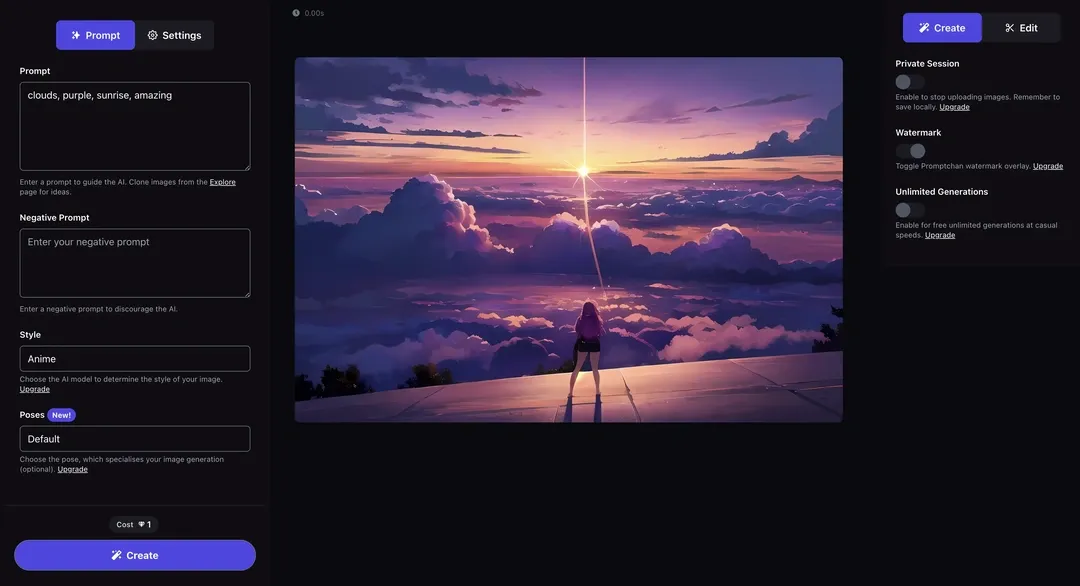
The creation screen is dense. That’s the argument, not a complaint. Model, pose, filter, emotion, aspect ratio, quality, all on one panel. Add a negative prompt (up to 250 characters) listing what to keep out, and most competitors simply don’t give you the option.
Styles split two ways: photorealism (Real, Hyperreal, Realism XL) and anime (Anime XL, Hyperanime, K-Pop, Illustration), plus a couple of niches like Furtoon. Quality is tiered: Ultra is the floor, Extreme adds detail, Max is the ceiling. Each step up burns more Gems.
A creativity slider decides how obedient the model is. Low, and it sticks to the script. High, and it starts improvising on top of it, useful once you’ve already found a look and want variations, not copies.
The real trick sits in a carousel at the bottom of the panel: pick an AI you already built instead of starting from a blank face. You’re not generating a stranger every time, you’re dropping the same character into a new scene. That’s what separates this from an ordinary prompt box: a character becomes something you build once and reuse, not a one-off roll of the dice.
The catch is the usual one. Quality tracks your prompt, hard. Realistic portraits can be excellent. Anime and illustration hold up more consistently than photorealism does. Hands, crowded scenes, multiple bodies in one frame: still a coin flip, here as everywhere on these architectures. Two fixes below, sharper prompts and the inpainting tool, get you out of the re-roll loop.
Camera angles, and how to actually write a prompt that works
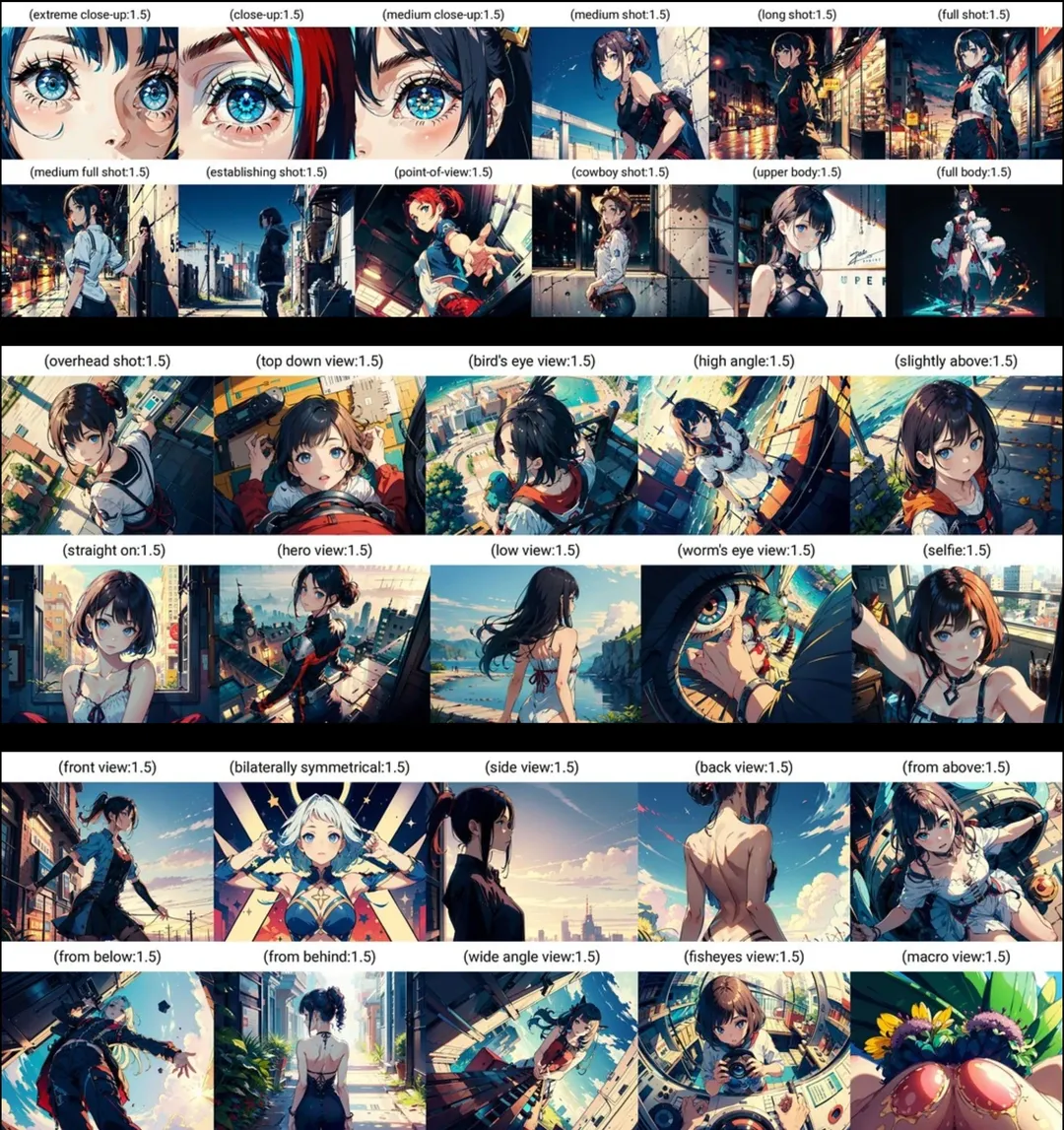
Promptchan runs its own prompting guide, and it’s worth the five minutes even if you’ve read a dozen AI-art tutorials already. The advice is concrete, not generic.
A prompt stacks in layers: subject, setting, style, medium, palette, mood, detail level. Skip one, and the model invents something generic to fill it. Their own guide is blunt about where most disappointing results come from: “the negative prompt is where you put what you don’t want, it is the single fastest fix for most disappointing results.” Don’t fight the main prompt to exclude something. List it separately. Let the model steer around it.
Emphasis runs on double parentheses. ((red)) dress weights that detail harder than the rest of the sentence. Small syntax, big difference between a colour that whispers and one that owns the frame.
The part almost nobody else documents: camera control. More than 28 named angles, in three families. Distance (extreme close-up through full body). Elevation (overhead, bird’s-eye, worm’s-eye, from below). Orientation (front, back, side, wide, fisheye). One keyword changes composition more reliably than a paragraph of prose ever will. Stuck generating the same flat, front-on portrait every time? This is the fix.
The guide’s real lesson is discipline: generate, diagnose what’s off, adjust one variable, regenerate. Not fifty random rolls. Character consistency and keyword blending compound on top of that once you’ve got a base worth keeping.
Inpainting, outpainting, fixing the hands
The other differentiator, and third-party reviewers call it out by name: editing after the fact instead of starting over. Mask a region, regenerate just that patch. That’s how you fix a mangled hand or a background glitch without losing everything else in the frame that already worked. Outpainting extends the canvas past the original edges. Style adjustments nudge a finished image toward a different look, no new prompt required.
One independent review (Synthlust) puts it sharper than we would: “Promptchan excels where others compromise: while competitors bolt image generation onto chat platforms, this tool provides professional-level editing control comparable to desktop AI art software but in an accessible online format.” Matches what we saw testing both sides. Chat-first apps treat the generator as a bonus screen. Promptchan treats it as the product, and builds the tools to match.
Promptchan’s Explore feed, underrated
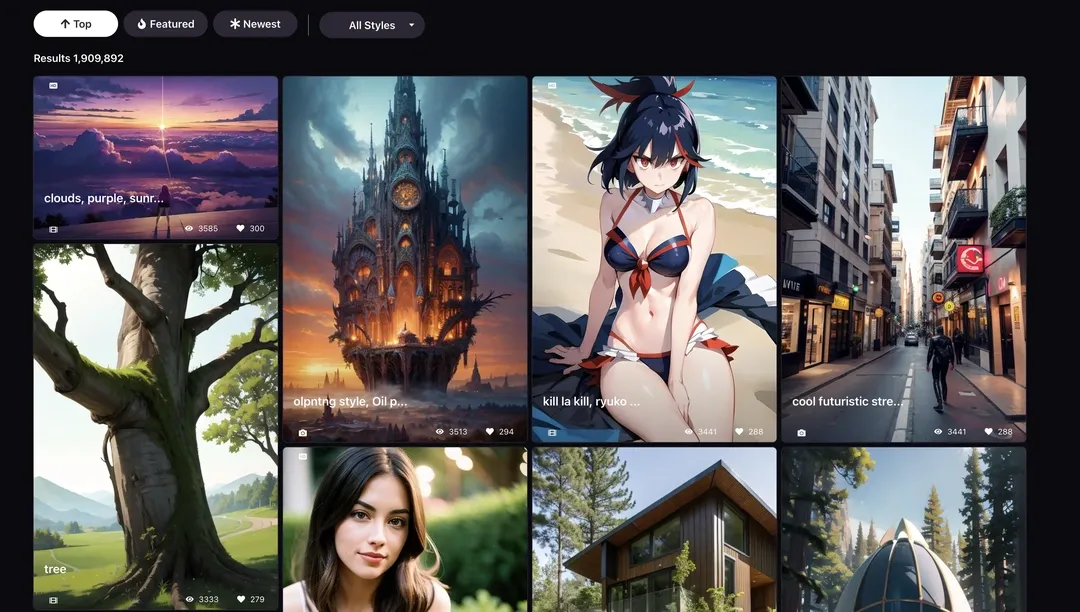
Didn’t expect to spend this much space here. It’s what keeps the tool from feeling cold.
Scroll public creations, open one, and you get the full prompt, format, quality, style, filter, pose, emotion, seed. Not a wall of pretty pictures. A set of instructions. You see exactly how a result got made before you decide to steal it.
Five actions sit under every image: Clone, Animate, Tweak, Nature of use, Chat. “Nature of use” is the one label that isn’t self-explanatory; the rest need no caption. A discovery becomes a starting point instead of another bookmark. Twenty million entries deep, the feed doubles as a searchable library of prompts that already work, sortable by Top, Featured, Newest.
Still learning to prompt well? This is the best classroom in the ranking. Reviewers back that read: one comparison (AIGirlfriendRanking) calls the community gallery “unique in this space,” pointing out Candy.ai and SoulGen don’t have an equivalent browsable, cloneable feed of other people’s prompts.
Style range, and how it stacks up
Third-party testing lines up with the interface’s own pitch: 15-plus named art styles, hyperrealistic through anime through 3D render, wider than the handful of presets most chat-first companion apps bolt onto their sidebar. One review (AIDateReviews) singles out the anime engine as “among the best we’ve tested in this niche,” a stronger claim than most generators earn, since anime is usually the mode every tool does adequately and none do well.
The same review makes a claim worth checking yourself, not taking on faith: NSFW output holds up “across all art styles with no quality degradation,” meaning explicit renders aren’t a cut-corner mode bolted onto the SFW engine. On price, reviewers place the entry Plus tier anywhere from $5.99 to $11.99 depending on region and promotion, cheaper than comparable single-purpose generators like SoulGen (around $12.99/month), with full inpainting access from the first paid tier up.
The real cost, in Gems
Here’s the number that decides everything, and the one affiliate pages leave out:
- An image, common configuration: around 2 Gems.
- A video, standard configuration: around 18 Gems.
- A voice message: 1 Gem. A voice call: 2 Gems.
Paid tiers include 100 Gems (Plus), 400 (Premium), 800 (Pro) a month, plus 50% off anything extra you buy.
Do the maths. 100 Gems is roughly fifty simple images, or five videos. A subscription doesn’t make everything unlimited. Only the Pro plan’s Casual generations get that treatment. Max quality, variations, voice, and video above all, drain the counter fast.
How much does Promptchan actually cost?
| Plan | Monthly price | Gems included | What it adds |
|---|---|---|---|
| Free | $0 | daily allowance | Images, chat, cloning public creations |
| Plus | $14.99 | 100 / month | Priority access, high quality, basic styles |
| Premium | $23.99 | 400 / month | More styles and features |
| Pro | $33.99 | 800 / month | Unlimited Casual generations, full video, custom characters, voice calls, max quality |
Be careful with the numbers floating around elsewhere. Several reviews quote $4.49, $5.99, $10.19 or $11.99 for the entry tier. Promotions, all of them, not the standing price, and every third-party figure we cross-checked for this review landed in that same promo bucket. The site runs a 20% discount at checkout often enough that most reviewers likely caught it mid-campaign.
Refunds: within 30 days, provided you haven’t made significant use of the AI services. Crypto payments: stated non-refundable. Translation: test on the free tier. Not after you’ve burned 400 Gems.
Promptchan’s video tool, and what the tutorial adds
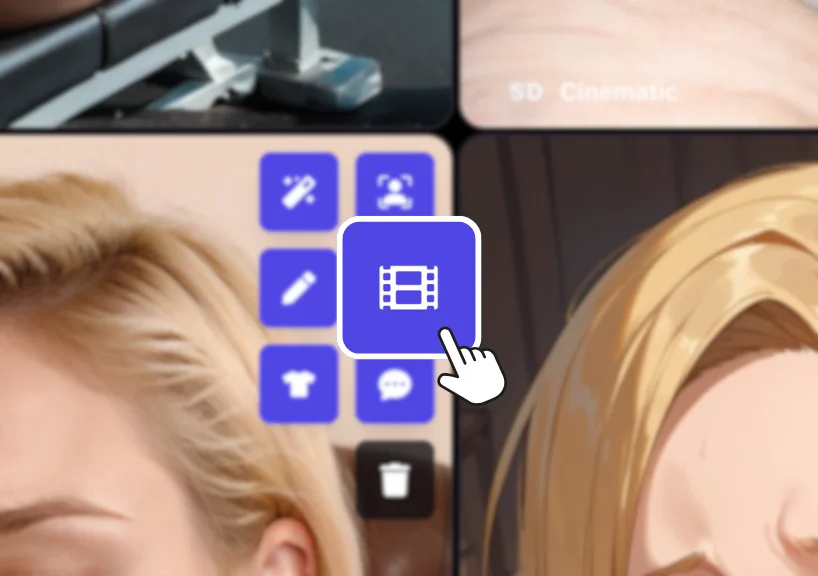
Same logic as the image: style, pose, an image to animate or an existing character, then a description of the motion. Promptchan’s own tutorial makes one thing explicit: write the prompt for movement, not a static description, and that’s the line between a stiff clip and one that actually convinces.
Two doors in. Text-to-video builds a clip straight from a written description, no starting image needed. Image animation takes a still, yours or one cloned from Explore, and brings it to life, either on autopilot or with a motion prompt you write yourself. Extend lengthens an existing clip, same pose or a new beat, so a render doesn’t have to stop where the first generation left off.
Controls: motion type, aspect ratio (portrait, wide, square), audio on or off, quality tier, the same shape as the image workflow. Generation runs in the background, so you keep creating while a clip renders, and the platform shows a Gem cost estimate before you commit. One thing to know before you get attached: undownloaded clips expire after 24 hours unless you publish them.
Stills win us over more. Motion still loses its edge of naturalness sometimes, and the cost per clip (around 18 Gems) isn’t close to the cost of an image. Full-length video, Extend included, with monthly refills and faster processing, stays locked to the $33.99 Pro plan.
The chat, and what’s beyond a simple exchange
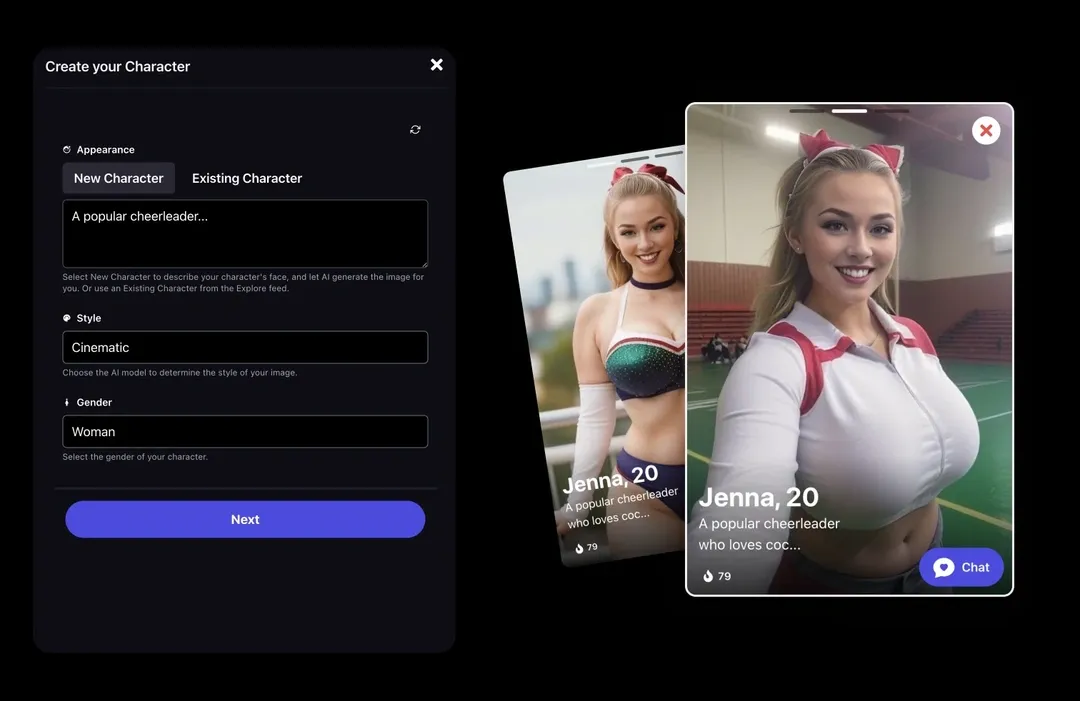
Start a conversation from any character in the feed, or from your own. Two modes: Chat, texting-plain, and Story, where you direct the scene chapter by chapter and the AI narrates around your calls. Switch between them and the current history clears. Know that before you get attached to a thread.
Two models sit behind it. v2.5 Pro, tuned for depth and immersion. v2.5 Fast, quicker and lighter for short back-and-forth. More than 50 prewritten scenes drop a character straight into a situation instead of a blank prompt.
The feature that actually earns its place: generating an image mid-conversation. Describe what’s happening, and the tool renders it from that context, no screen switch, no prompt rebuilt from scratch. That’s the clearest proof the chat was built as a front-end for the generator, not the other way round.
What works: no aggressive filter, freedom most mainstream apps won’t hand you, characters that hold their role across a session, voice with a couple of free timbres and the rest on a plan, live calls on paid tiers. What doesn’t: memory isn’t what this product sells, and a custom character built specifically for chat sits behind the $33.99 Pro wall. For something you’d call a relationship, Nomi holds the thread longer.
One line of lucidity, because it’s worth saying once: a character that remembers your day is still predicting the next word, not missing you. Worth keeping in mind before Gems start feeling like a phone bill for someone who exists.
Does Promptchan allow NSFW content?
Unfiltered, no pretence. Nothing blurred until you pay, no intimate register locked behind a plan. The free tier lets you judge before you buy, which Nemora and FlirtCam won’t let you do.
“Uncensored” doesn’t mean lawless, though, and that’s the nuance competitors skate past. The terms explicitly bar minors, non-consensual intimate deepfakes, and celebrities or real people used without consent. The platform runs a multi-stage AI filtering system, scanning prompts, renders and uploads automatically, backed by a reporting flow and human moderation as the last line.
Plainly: stick to fictional adult characters, and never upload a real person’s photo without their say-so. Not legal advice, and the rules shift by country regardless.
Dial in a fully naked, explicit pose on a fictional character, and the generator delivers it in one pass on the free tier. No blur, no upsell screen. Just the Gem count dropping.
A developer API, if you build on top of it
Not for most readers, but worth flagging: a public API covers image generation, chat and video behind one authentication key. Built for developers wiring generation into their own product, not for someone comparing companion apps on a Tuesday night. Not you? Skip it. Is you? The getting-started docs cover authentication and endpoints straight from the site.
How Promptchan markets itself against Character.AI
Promptchan runs its own “NSFW Character AI Alternative” piece, and it’s worth reading with the right filter switched on: this is the company’s own marketing copy, not an independent comparison. “No Filter Access,” “unrestricted NSFW AI experience,” “unlimited possibilities”: none of it names what Character.AI actually blocks. Standard shape for a self-published competitor page.
The direction underneath isn’t controversial, though. Character.AI runs a strict filter and has no adult mode, so a platform built around uncensored generation is, by definition, less restricted on that one axis. Read the framing as a company talking its own book. Take the factual core, filtered versus not, at face value, and leave the rest.
What independent reviewers say
Beyond our own testing, a few dedicated review sites land on the same three or four points:
- Image quality for the price. Synthlust calls it “the best uncensored image generator on the list for the price,” crediting the realistic engine for lighting, skin texture, body proportions that hold up.
- A free tier that actually works. More than one review notes the Gems allowance is enough to genuinely test the product, not a locked demo screen dressed up as one.
- Pricing that doesn’t hide. AIGirlfriendRanking flags “three clearly listed tiers, no hidden upsell at checkout,” worth noting given how many competitors bury the real number behind a discounted first screen.
- Anime that isn’t just present, it’s good. Same conclusion, independently reached: the anime engine punches above the category average.
None of that replaces trying the free tier yourself. But when several outlets that tested this independently converge on the same points, it’s a decent sanity check.
Promptchan’s operator, and your data
Rare in this ranking: the operator is identifiable, and European. VisionAI Labs Limited, The Black Church, St. Mary’s Place, Dublin. Irish law governs the terms. Against the Cypriot LTDs and the holdings with no declared country that fill this segment, this one has an actual address, and someone identifiable to write to.
One wrinkle: the iOS app is published by AI Research Group Limited, a different name from the one in the terms of service. Not necessarily a red flag. Just not the same entity.
The thing to actually watch sits in the terms: public and private mode don’t grant you the same rights. Public, and you keep your rights but hand Promptchan and other members a very broad licence over what you publish, prompt included. Private or offline, the company claims no rights over your images or prompts at all.
Check the mode before you generate. Not after. On analytics: PostHog, session replay included, plus Google Analytics and Google Ads, gated behind consent.
Does Promptchan have a mobile app?
An iOS app exists, free, rated 17+, 4.2 out of 5 across 800-plus ratings. No Android listing: on Google Play you’re staying on the site, which is properly built for mobile regardless.
Don’t expect the iOS app to match the web version’s freedom. App Store rules won’t allow it. The web stays the reference copy.
Verdict
The best unfiltered visual studio in this ranking, and the most configurable, full stop. A feed that shows its prompts, one-click cloning, real editing tools (inpainting, outpainting, a documented camera-angle system), a direct line to animation or chat: it’s built to be experimented with, and few competitors manage that. Independent reviewers land on the same read we did: strongest on image quality and style range, weakest as a place to actually hold a conversation.
Two things to accept before you pay. Gems need watching, constantly. And the chat won’t reach the depth of an actual companion app. Not the tool for a relationship.
Start free. No card required. Watch three things: the Gem counter before every generation, the public-or-private setting, and how far a well-written prompt, camera angle included, takes you next to a lazy one. One evening tells you whether $14.99 is worth it. Yours to decide.

Chris Hutchinson
Writer, AI Companion List
Passionate about tech, AI, and robots, he has been trying out AI companion apps since 2026, for fun as much as for the job.
Go deeper
- Which AI companions are actually uncensored? All 25, rated
- Which AI companions actually send images and video?
- Best AI girlfriend for voice and phone calls: which ones actually pick up?
- Best AI Roleplay App for iOS: What Apple Actually Lets You Install
- Best AI Waifu App in 2026: Anime AI Girlfriends That Keep Her Face, Her Voice and Her Memory
Alternatives to Promptchan
 Kindroid
 Nastia AI
 Crushi
 Secrets AI
Want to try Promptchan?
Start on the free tier: you will see for yourself what the conversation is worth before paying anything.
Try Promptchan for free Promptchan vs Candy.ai
 Promptchan vs Lovescape
 Promptchan vs Nomi