OurDream AI character creation: the complete guide
How OurDream AI character creation works: appearance, personality, voice, pre-made worlds, what tokens cost, and how to get a consistent character.
By Chris Hutchinson
- guide
- personalisation
- ourdream
Most companion apps hand you a character. OurDream AI hands you a wizard and a blank canvas: you pick the face, the body, the temperament, the voice, and the app builds the person you described. Then you find out whether the image on screen stays the same person from one render to the next.
This guide walks through what you can set, what the creator will not tell you up front, and the order that wastes the fewest tokens.
In short
- The creator is a multi-step wizard (a six-step progress bar sits at the top), starting with ethnicity and skin tone.
- You choose realistic or anime, and an AI girlfriend or boyfriend. The rendering holds up across straight, gay, bi, trans and anime profiles.
- Appearance, personality, relationship dynamic and voice are all configurable, but the personality stays secondary to the image.
- Lock the look on still images first. Video fails roughly 4 times out of 10 and every retry costs tokens.
- Do not feel obliged to build anything: you can step into a ready-made character or world instead.
How OurDream AI character creation works
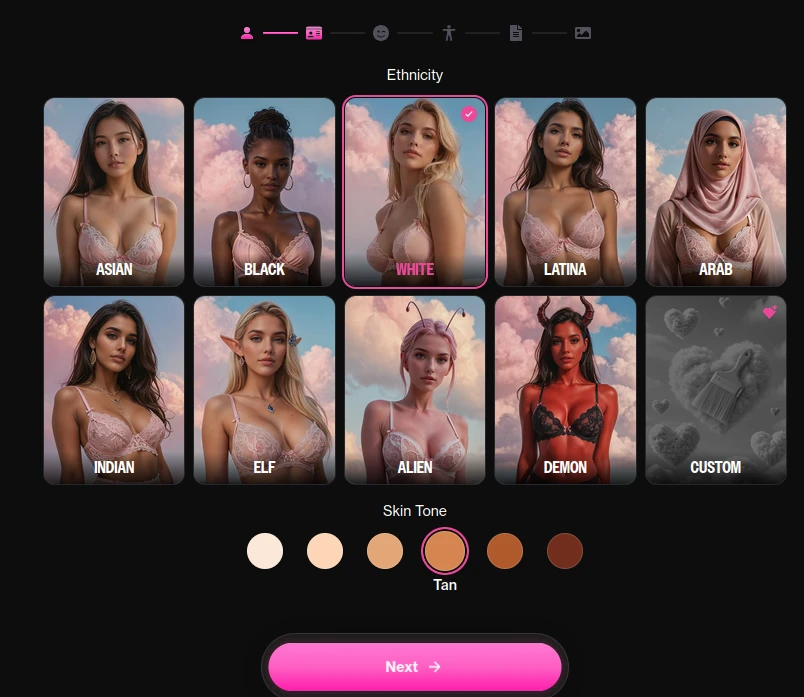
You start from the character creator on the site, in the browser: there is no mobile app, iOS or Android, at any tier. The creator runs as a step-by-step wizard with a progress bar across the top and a single “Next” button, so you never face one giant form.
The first screen asks for ethnicity, shown as a grid of picture tiles: Asian, Black, White, Latina, Arab, Indian, Elf, Alien, Demon, and a Custom tile at the end. Below sits a skin tone row of six swatches, from very pale to deep brown. The fantasy entries are not a gimmick: Elf, Alien and Demon give you pointed ears, antennae or horns and a skin colour to match, without a single line of prompting.
The publisher also lets you pick the art style, realistic or anime, and the same generator covers an AI girlfriend and an AI boyfriend, with the same level of customisation. That symmetry is rarer than it sounds: elsewhere in this segment, quality drops the moment you leave the photorealistic straight couple.
What you can customise on OurDream AI
The publisher lists four families of settings. Two of them decide what you see, two decide what you get in the chat.
Appearance. Face, body type, hair, clothing and accessories, on top of the ethnicity and skin tone from the first step. This is where the app is strongest: image generation is a finished feature, not a layer bolted onto a chatbot.
Personality. Character traits, interests and communication style. Subscribers can also lock the behaviour with custom instructions, which is the closest thing to a character sheet you will find here. It is a menu of choices more than a blank page: if you want to write three paragraphs of backstory in free text and watch the model respect them for months, that is Kindroid or Nomi territory, not this.
Relationship dynamic. You set how the character relates to you, and the publisher lists it as its own family of settings, separate from personality.
Voice. Roughly nineteen voices are available. Honest warning: they are flat and monotone, behind Candy.ai, and the weakest part of an otherwise polished creator.
Skip the creator: ready-made characters and worlds on OurDream
You do not have to build anything. OurDream AI also has a gallery of characters made by other users and a catalogue of ready-made roleplay worlds, with characters, lore and rules already in place. You show up, pick a role, play.
That is the fastest way to test the app, and the best way to see what a good character sheet looks like before writing your own.
If you do want to build the world yourself, OurDream exposes an RPG mode driven by commands typed straight into the chat. #lore sets the setting, #map places its locations and #pin npc pins a secondary character the model has to keep track of. Our full review covers this mode in detail.
Does OurDream AI keep your character consistent?
Mostly, with one caveat that matters more than any slider: prompt fidelity is not total. A garment changes between two renders, a pose comes out approximate, a background detail is ignored. Trustpilot feedback in 2026 is consistent on this point. The rendering itself stays excellent, so this is the flaw you accept here.
The practical consequence is simple. Generate stills until the face and body are right, then move on. Do not start with video.
Create your character on OurDream AI
Can you create an AI boyfriend on OurDream AI?
Yes, with the same wizard and the same level of customisation as for an AI girlfriend. Gay, bi and trans profiles get the same treatment too, and so do anime characters: the rendering holds the same level throughout. Our guide to creating your own AI boyfriend compares the apps that handle it best.
Is OurDream AI character creation free? What it costs
The app’s own pricing page gives two plans: $9.99 a month on annual billing (billed upfront, $119.88) and $19.99 a month on monthly billing. Both include unlimited messages with any character, access to image and video generation, and 1,000 tokens a month (the app calls them dreamcoins). The first subscription adds a 1,000 token bonus.
The free tier gives you 50 messages a day and 55 tokens. That is enough to run the creator and generate a few images before paying. What the publisher does not document is which creator options, if any, sit behind the paywall: the pricing page says nothing on it, so check it yourself in the free account rather than trusting a third-party list.
The real cost is not the creation, it is the iteration. Text chat costs no tokens, even on paid plans. Images and video draw from the counter, and with a video failure rate around 40%, a character you keep redoing drains a month of tokens in two weeks. Our guide to tokens versus unlimited plans shows how that compares across apps.
A creation order that wastes few tokens
- Create the character on the free tier. You see the real rendering level on your own niche before paying anything.
- Pick the art style first. Realistic or anime changes everything that follows, so settle it before touching the details.
- Generate three or four stills, not ten. If the face is wrong on the third, adjust the setup rather than rerolling.
- Write the personality last. A shy character with a confident face is a mismatch you notice in the first conversation, not in the wizard.
- Test the memory before you attach. Write three lines of
#lore, then check that the model still honours them one message later. - Only then spend tokens on video. A character whose look is settled fails less often than one you keep changing.
Is it safe to create a character on OurDream AI?
Depends what you put in. The publisher is a registered US company, Dream Studio USA, Inc., so ownership is verifiable, which is rare in this segment. The privacy policy, however, says all conversations are collected and shared with third parties, and does not clearly state whether chats feed model training or how long they are kept. The site advertises encrypted chats, the policy mentions no encryption.
So treat the creator like a public form. Keep your real name and identifying details out of the character sheet, and do not model a character on a real person without their consent: the app will render it, which is exactly why you should not. It is a text predictor wearing a face you chose, nothing more, and it stays easier to enjoy when you keep that in mind.
OurDream AI or another app for building a character
OurDream AI makes sense when the image and the video are the point and you want both from one subscription. Candy.ai is the reference for visual finish and speed, with images produced in under five seconds. Kindroid and Nomi suit you better if you want to write the character in free text and invest in long-term memory: creation takes longer there, and the result ages far better.
The classic trap is picking an app for its images, then blaming it six weeks later for conversing badly. That is not a hidden defect, it is the product you bought. For the wider picture, see how to create your own AI girlfriend.
Verdict on OurDream AI character creation
One of the most visual creators of the category, and one of the few that treats every profile the same. It is stronger on appearance than on personality, and the voice lags behind. Accept the browser-only access, build on stills before video, and start on the free tier: ten minutes in the wizard will tell you whether the face on screen is the one you had in mind.

Chris Hutchinson
Writer, AI Companion List
Passionate about tech, AI, and robots, he has been trying out AI companion apps since 2026, for fun as much as for the job.